
Lead Analytics overview
With Partnero affiliate programs, you can set up a lead submission page, where partners can submit potential customers and earn rewards for converted deals. Lead analytics helps you track and optimize the performance of your lead submission program.
This article breaks down the key metrics available in the Lead Analytics section to help you make more informed decisions and optimize your partner program.
Access lead analytics
⚠️ Important: Lead analytics are only visible if lead collection is enabled for the program. Read more.
To access lead analytics:
- Go to your Partnero dashboard and open your affiliate program.
- Navigate Analytics under Reporting & Management.
- Click on the Leads tab:
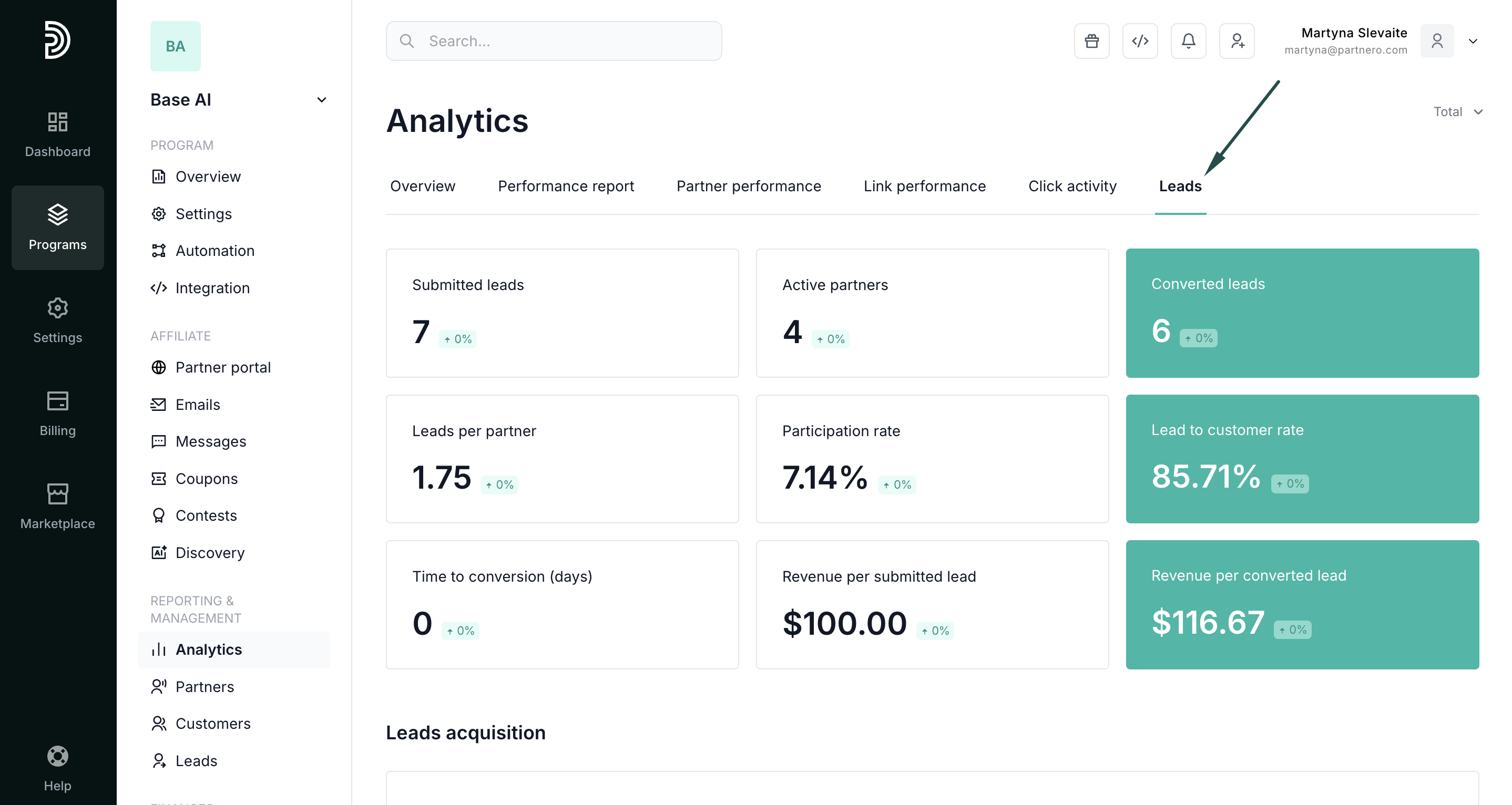
Lead metrics
Lead metrics provide visibility into partner-driven lead volume and acquisition trends. Below, we'll review available metrics, what they mean, and how they're calculated.
Summary metrics
These high-level metrics provide an overview of your lead generation performance.
- Submitted Leads: Total number of leads submitted by partners through your lead submission page.
- Active Partners: Number of partners who have submitted at least one lead during the selected time period.
- Converted Leads: Total number of submitted leads that have successfully converted into customers.
Conversion metrics
Understand how efficiently your leads are turning into customers and generating revenue.
- Lead-to-Customer Rate (%): Measures conversion efficiency.
Formula: (Converted Leads ÷ Submitted Leads) × 100 - Revenue per Converted Lead: Average revenue generated from each converted lead.
Formula: Total Revenue from Converted Leads ÷ Number of Converted Leads - Revenue per Submitted Lead: Average revenue generated per submitted lead, regardless of conversion.
Formula: Total Revenue from Converted Leads ÷ Total Submitted Leads - Time to Conversion: The average number of days it takes for a submitted lead to convert.
Partner attribution & performance
Take a closer look at how your partners contribute to lead generation and conversion.
- Leads per Partner: Average number of leads submitted per active partner.
- Participation Rate (%): Percentage of partners who are actively submitting leads.
Formula: (Active Partners ÷ Total Partners) × 100 - Top Performing Partners: Identify top partners based on the volume of leads submitted.
Lead acquisition table
Next, you'll find the Leads Acquisition table. It provides a detailed breakdown of all acquired leads, with flexible views available daily, monthly, or yearly. It helps track lead volume trends over time, monitor performance consistency, and identify seasonal patterns.
Top partners view
Lastly, you'll find the top partners view, which ranks partners by the total number of leads they have submitted. 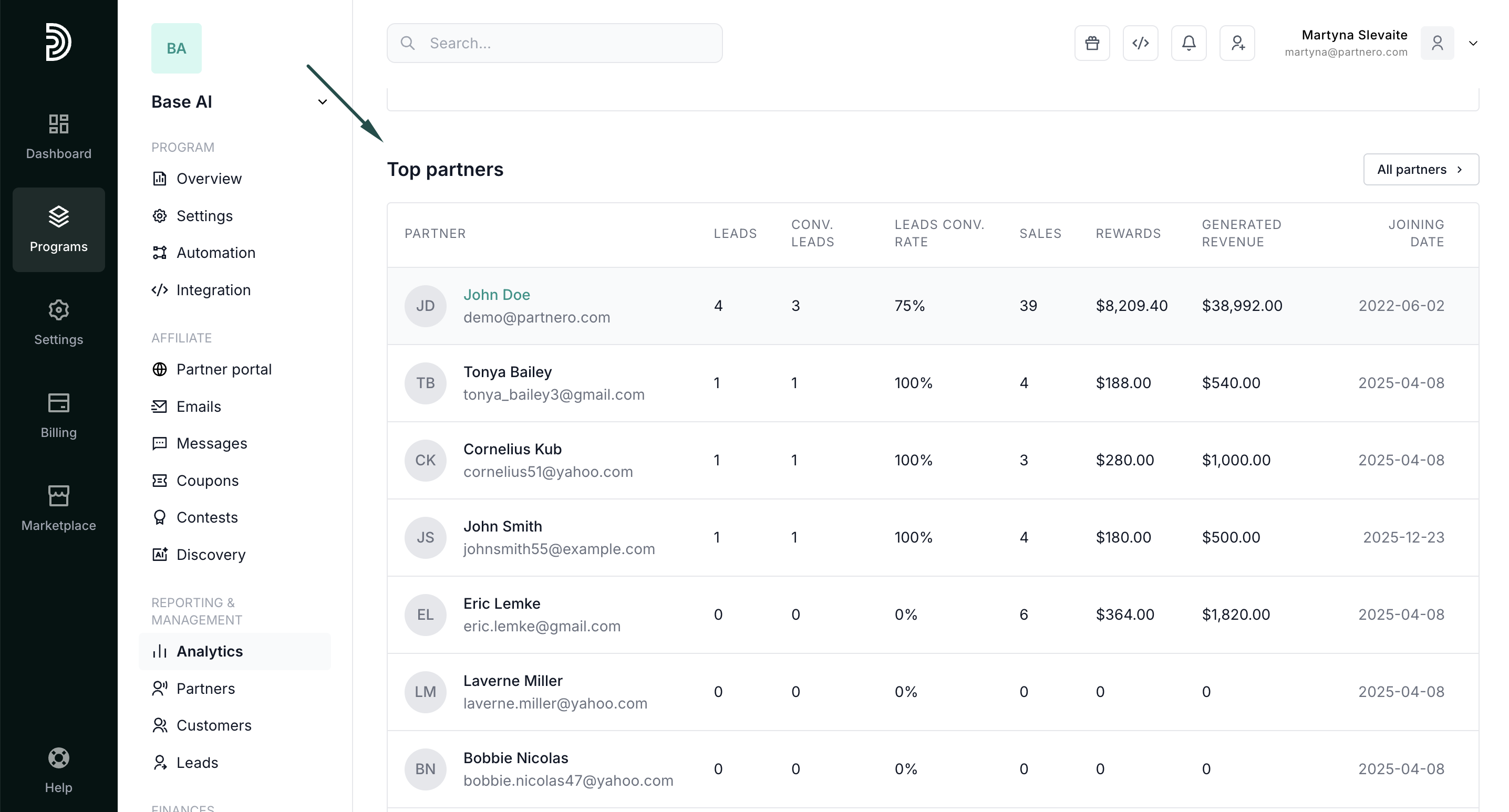
The table columns show:
- Partner: partner information. Click through to access their profile.
- Leads: number of leads submitted
- Converted leads: number of converted leads.
- Leads conversion rate: percentage of leads that converted.
Continue reading about analytics
- Analytics Overview – High-level dashboard summary of your program’s performance
- Performance Report – Detailed breakdown of conversions, revenue, and partner results
- Partner Performance – Compare and evaluate individual partner results
- Link Performance – Analyze how individual tracking links are performing
- Click Activity – Review detailed click-level data and traffic insights